How to Mine Coins in Merge Dig Simulator
Break cube blocks, time Coin Potions, and let extra pickaxes orbit the wall.
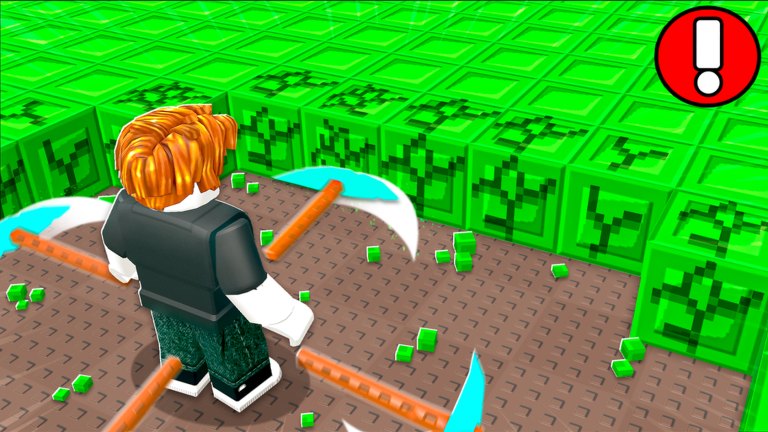
Mining is how Merge Dig Simulator prints the coins that buy duplicates. The Roblox listing says “Mine For Coins,” and official screenshots show an avatar facing a wall of bright green cubes while several pickaxes spin through the blocks. If your session does not look at least a little like that screenshot, you are probably in a menu.
This guide is the mining half of the loop. The spending half is merge pickaxes plus the upgrade tier list.
What you are hitting
The visible ore in promotional shots is a Minecraft-like green cube wall on a brown tiled floor, with smaller green shards on the ground after impacts. You do not need a separate “vein detector.” Walk to the cubes and stay in range so every orbiting pickaxe actually collides.
If you back up to admire the avatar, the tools miss. If you face a cave tunnel with no cubes (the dark “Start” tunnel in comparison art), turn around and find the block field.
How pickaxes hit
Early on, you swing one tool. Later, extra pickaxes orbit and strike on their own, which is why the Day 99 thumbnail looks busier than Day 1. More tools in orbit means more hits per second against the same wall. Merging upgrades the quality of those hits; extra copies can upgrade the quantity. Both matter, but quality (merged tiers) should lead, or you become a cloud of weak sticks.
Stand close, camera slightly down, so you can see chips flying. If chips stop, you moved out of range or the wall broke and you need to step forward. Controls cover camera pinch on mobile and mouse drag on PC.
Coin Potion mining
When Release gives you a Coin Potion, mining is the only action that respects the timer. Activate it from Potions, then:
- Plant yourself on a dense cube face.
- Do not open Shop except to merge or buy a duplicate you already planned.
- Do not teleport to a friend’s joke corner of the map.
- When the wall thins, step into the next cubes instead of waiting.
Ten minutes of focused hits beats thirty minutes of wandering with the potion off. Reward details are on code rewards. Redeem steps are on how to redeem.
Premium and group bonuses while mining
Premium’s +10% coins only exists if you are actually breaking blocks. Group and like exclusives are one-time flags; they do not replace a potion. Inviting friends can add rewards and also fill the eight-player cap, which may help or hurt frames. If the server stutters, hop to a quieter instance — coins you cannot click do not count. See group and Premium and the players hub.
Idle versus active
This is an incremental simulator, not a guaranteed full AFK tycoon. Public copy does not advertise offline earnings. If you walk away from the device, assume coins pause unless you have verified an idle upgrade in your own HUD. Do not trust a script vendor who says otherwise. The scripts hub explains why auto-mine tools are a ban conversation, not a feature list to paste into your executor on day one.
If you need a short AFK moment, park against the cube wall with tools already orbiting, then come back to merge. That is a pause, not a strategy.
Mining goals that are worth tracking
- Coins needed for one duplicate of your current pickaxe.
- Coins needed for the next named unlock on the pickaxe tier list.
- Whether a potion is sitting unused in Potions.
- Whether you are on a full, laggy eight-player server.
The session checklist turns those four bullets into a pre-flight list. Fast progression tells you which bullet to chase first after the tutorial hour.
When mining feels too slow
Slow is usually one of: no duplicate merges yet, potion still in inventory, standing off the wall, or playing a different merge game’s expectations. It is rarely “the code is secretly nerfed.” Check updates for real patch notes, then return to the wall. The green cubes are the whole economy.
Frequently Asked Questions
Quick answers to the most common questions.
Where do I mine in Merge Dig Simulator?
On the cube block fields — official shots show bright green cubes on a brown floor. Face the wall so orbiting pickaxes collide.
Does mining work while I am in the Shop?
Do not count on it. Activate potions and swing on the blocks. Menu time burns Coin Potion duration.
Do I need more pickaxes to mine faster?
Merged higher-tier tools hit harder, and later setups show multiple pickaxes orbiting. Buy duplicates to merge, not a pile of mismatched names.
Is there AFK mining?
The public listing does not promise offline income. Park on a wall only as a short pause, and skip unverified auto-mine scripts.