Merge Dig Simulator Guides
How to merge pickaxes, mine coins, and stop wasting the only public code.
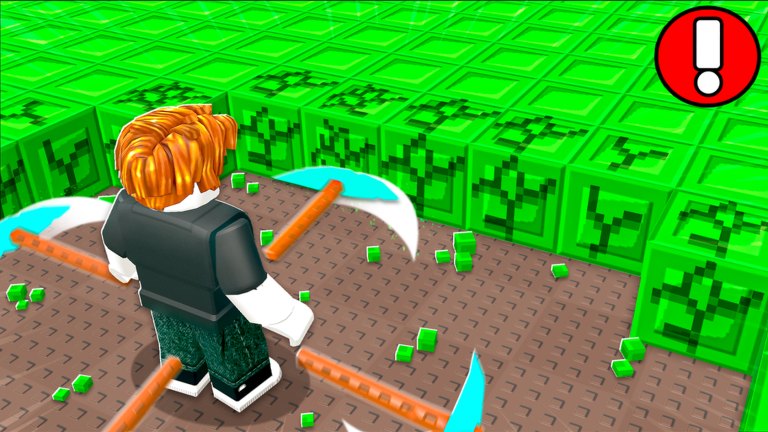
This hub is the tutorial layer of the Merge Dig Simulator wiki. Codes tell you what to type. Tiers tell you what is worth buying. Guides tell you what to do with your hands in the cave.
Official copy on the Roblox page is short: merge pickaxes, mine for coins, buy upgrades, unlock pickaxes. The pages below unpack that loop without borrowing mechanics from CrazyGames Merge & Dig or from Roblox Merge Simulator.
Start here
- Getting started — first spawn, like/group flags, first merge, first potion.
- How to merge pickaxes — two identical tools become the next tier, including Diamond → Secret.
- How to mine coins — block fields, orbiting pickaxes, potion windows.
- Fast progression — a one-hour plan that does not depend on Robux.
- Group and Premium — +10% coins, likes, invites, Merge Diggers.
- How to get the Secret pickaxe — Diamond + Diamond, not a code.
- How to invite friends — eight-player servers and listing gifts.
If you only open one guide today, open getting started, then jump back to the codes hub and redeem Release before you forget.
How the loop actually feels
You spawn with a weak pickaxe (official “Start” art shows a rusty cave tool). You break green cube blocks, coins land, you buy another copy of the same pickaxe, you merge the pair, your character now swings something better — and later several tools orbit you at once, which is the “Day 99” thumbnail. That is the whole fantasy: more pickaxes, better pickaxes, denser coin rain.
Nothing in the public listing asks you to hatch eggs, run a tycoon dropper, or clear a story dungeon. If a YouTube thumbnail promises a secret pet, it is probably a different game. Stick to pickaxes until an update says otherwise.
Pain points these guides exist to fix
- Wrong redeem box — people type codes in chat. Fixed in how to redeem.
- Potion wasted in Shop — fixed in code rewards and how to mine.
- Hoarding identical pickaxes — you need two of the same to climb. Merge guide.
- Spending coins on cosmetics — upgrade tier list.
- Skipping the free group like — group and Premium.
- Playing the wrong Merge Dig — this wiki is only Roblox Merge & Dig! by Merge Diggers.
Suggested reading order
New account: getting started → redeem → mine → merge → group flags → tier list. Returning player after a patch: changelog → codes → session checklist. Someone considering automation: read scripts last, after you understand the legal and account risk.
Devices
The listing supports PC, mobile, tablet, and console. The loop does not change; the HUD does. If Shop or merge inputs feel invisible, open controls before you assume the feature is missing.
Use the players hub if you are deciding whether Premium is worth it for a casual miner. Use links when you need Discord instead of another tutorial. Guides here stay practical: what to tap, what to merge, what to ignore.
Frequently Asked Questions
Quick answers to the most common questions.
Which Merge Dig Simulator guide should I read first?
The getting started page, then how to merge pickaxes once you own a duplicate tool.
Are these guides for the CrazyGames Merge & Dig?
No. They only cover the Roblox experience Merge & Dig! by Merge Diggers.
Do I need Robux to follow the guides?
No. The recommended path is codes, group likes, merging, and mining. Premium is a +10% coin bonus, not a requirement.
Where do I go after the beginner pages?
Open how to get Secret and the pickaxe tier list, or invite friends if you want a shared wall.